Sorry I Lied princess costume example
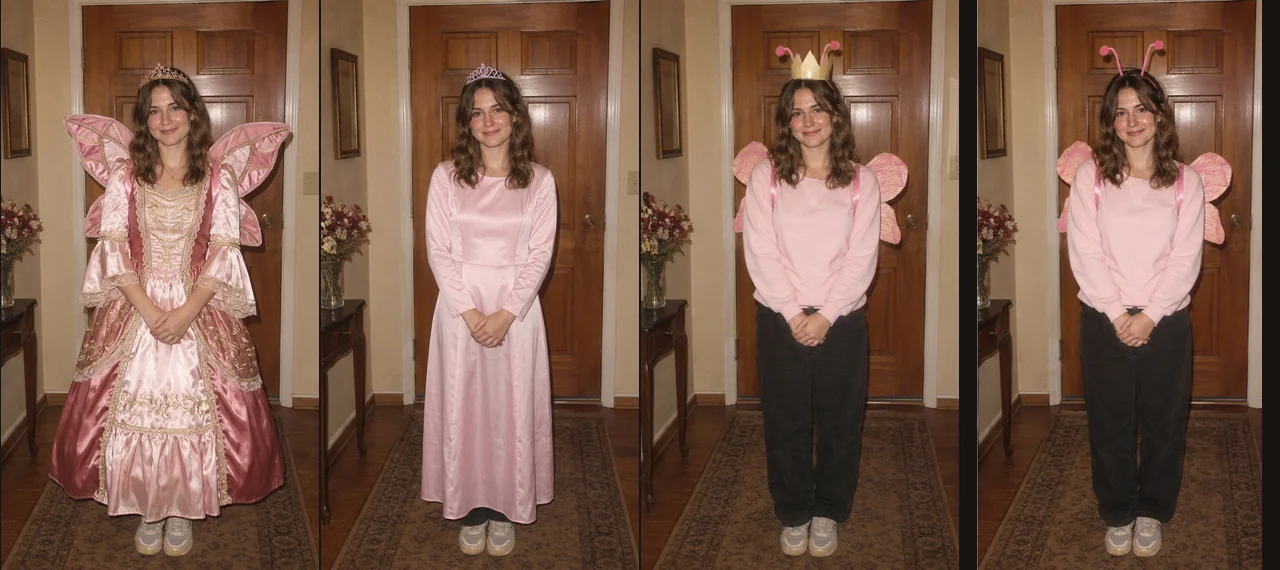
Compare a synthetic input photo with three AI princess costume edits and the unchanged original.
This example uses a synthetic adult photo and our princess costume prompts. The three AI edits move from an elaborate gown to a simpler costume and a small handmade detail. The final slide is the original image.
What changed in the pictures?
The first edit gives the costume a more elaborate dress and accessories. The middle image reduces the outfit's polish. The third brings the look closer to an ordinary homemade costume. Compare those edits with the final input, including the person's face, hands, pose and doorway.
The costume is not the only thing AI can change. Look closely for shifts in facial details, texture and background. The reference and prompts encourage consistency; they do not guarantee an exact match. This example is one outcome, not a promise about your upload.
How the example was made
The same original image was supplied independently for each edit. The costume prompts requested three levels of elaboration while preserving the subject and scene. The model was Nano Banana 2 through APIMart, using the 1K setting. The four images were then arranged in the editor with captions.
The synthetic input was created for demonstration. It does not depict a customer, and these images are separate from the credited creator reference in the homepage video.
What would a similar set cost?
A new set consists of three AI image requests at 5 credits each, for 15 credits total before redos. The $4.99 Starter pack covers that amount. The $19.99 Play pack includes 75 credits and the $49.99 Creator pack includes 225 credits. Downloading the original, changing captions and repeating the export add no generation cost.
If a result needs another attempt, redo only that slide. Each successful redo uses another 5 credits, so a pack's advertised reveal count assumes no redos. See the full package comparison.
Try it with your own photo
A picture with visible clothing makes the gown change easier to read. Leave room above the head if you want the crown to remain visible. Use an adult's photo only with permission. For a different silhouette, try butterfly, astronaut, fairy, witch or vampire.
Open the Sorry I Lied AI generator and choose Princess after uploading your original. Use the step-by-step guide for captions and export.